【备忘录】工作与学习

生活工作备忘录与待办事项。

Google浏览器插件

Tampermonkey

Tampermonkey(油猴)是一款针对于浏览器运行脚本的插件,一款必装的浏览器插件神器。

可以去脚本市场 greasyfork 去下载自己想要的插件,非常实用。

这里推荐两个常用的脚本:

下载地址

Wappalyzer

可以发现网站上使用的技术。 它检测内容管理系统,电子商务平台,Web 框架,服务器软件,分析工具等。

下载地址

OneTab

当有太多的标签页时,单击OneTab图标,将所有标签页转换成一个列表。再次访问这些标签页时,可以单独或全部恢复它们。

下载地址

Adblock Plus

Adblock Plus 广告拦截器可有效的拦截所有网页上的所有类型的广告。

下载地址

Octotree

这款神器可以GitHub平台代码在最左侧显示出树状目录,非常人性化的设计,你可以点击左侧目录切换到项目中的任意一个位置中去。

下载地址

Hexo插件

hexo-admonition

​ Hexo 内容辅助插件,支持将类似 reStructuredText 的警告提示块添加到 Markdown 文档中。

安装

hexo-butterfly-charts

​ 将 hexo poats、类别和标签的统计数据呈现到图表中。

安装

hexo-deployer-rss3

​ Hexo 的 RSS3 部署插件。

安装

hexo-math

​ 通过标签插件在 Hexo 帖子/页面中嵌入 KaTeX 和 MathJax。

安装

数学公式 \[E=mc^2\]

hexo-referenc

​ 在 Hexo 博客文章中支持 Markdown 脚注和 Wiki 样式工具提示参考的插件[1]

安装

流程图

classDiagram
Class01 <|-- AveryLongClass : Cool
Class03 *-- Class04
Class05 o-- Class06
Class07 .. Class08
Class09 --> C2 : Where am i?
Class09 --* C3
Class09 --|> Class07
Class07 : equals()
Class07 : Object[] elementData
Class01 : size()
Class01 : int chimp
Class01 : int gorilla
Class08 <--> C2: Cool label

hexo-simple-mindmap

基于百度脑图的开源库 kityminder开发的hexo思维导图插件。

安装

思维导图

  • 知识图谱
    • Golang
    • Python
    • Java
      • JVM
  • 消息队列
    • Kafka
    • Pulsar

hexo-spoiler

折叠博客内容,实现根据需要显示/隐藏博客内容[2]

安装

hexo-git-backup

Hexo 博客备份

安装

1
$ npm install hexo-git-backup --save

配置

1
2
3
4
backup:
type: git
repository:
github: git@github.com:xxx/xxx.git,branchName

命令

1
2
// hexo b
hexo backup

npm与node环境更新

更新记录

npm install -g npm更新npm失败

1
2
3
4
5
6
7
/usr/local/bin/npm -> /usr/local/lib/node_modules/npm/bin/npm-cli.js
/usr/local/bin/npx -> /usr/local/lib/node_modules/npm/bin/npx-cli.js
npm WARN notsup Unsupported engine for npm@8.2.0: wanted: {"node":"^12.13.0 || ^14.15.0 || >=16"} (current: {"node":"13.9.0","npm":"6.14.8"})
npm WARN notsup Not compatible with your version of node/npm: npm@8.2.0

+ npm@8.2.0
added 67 packages from 17 contributors, removed 287 packages and updated 147 packages in 4.402s

发现需要依赖的node版本不对

1
2
3
4
5
# 输入命令 npm install -g n
npm does not support Node.js v13.9.0
You should probably upgrade to a newer version of node as we
can't make any promises that npm will work with this version.
You can find the latest version at https://nodejs.org/

因此单独更新node

更新node

查看当前node版本
1
2
3
4
5
6
7
8
9
10
11
12
13
node –v
internal/modules/cjs/loader.js:983
throw err;
^

Error: Cannot find module '/Users/wangpeng/Projects/MyProject/weitrue.github.io/–v'
at Function.Module._resolveFilename (internal/modules/cjs/loader.js:980:15)
at Function.Module._load (internal/modules/cjs/loader.js:862:27)
at Function.executeUserEntryPoint [as runMain] (internal/modules/run_main.js:71:12)
at internal/main/run_main_module.js:17:47 {
code: 'MODULE_NOT_FOUND',
requireStack: []
}

直接报错

安装n模块

1
npm install -g n

升级到指定版本/最新版本

n v@version

可以告诉管理器,安装最新的稳定版本

1
2
3
n stable
installing : node-v16.13.1
mkdir : /usr/local/n/versions/node/16.13.1

安装稳定版本

1
2
3
4
5
6
n v16.13.1
installing : node-v16.13.1
mkdir : /usr/local/n/versions/node/16.13.1
mkdir: /usr/local/n/versions/node/16.13.1: Permission denied

Error: sudo required (or change ownership, or define N_PREFIX)

需要授权

1
2
3
4
5
6
sudo n v16.13.1
Password:
installing : node-v16.13.1
mkdir : /usr/local/n/versions/node/16.13.1
fetch : https://nodejs.org/dist/v16.13.1/node-v16.13.1-darwin-x64.tar.xz
installed : v16.13.1 (with npm 8.1.2)

检查是否安装成功

1
2
node -v
v16.13.1

更新npm

1
2
3
4
5
6
7
8
9
10
11
12
13
14
15
16
17
18
19
20
21
22
23
24
npm install -g npm
npm ERR! code EACCES
npm ERR! syscall rename
npm ERR! path /usr/local/lib/node_modules/npm
npm ERR! dest /usr/local/lib/node_modules/.npm-i9nnxROI
npm ERR! errno -13
npm ERR! Error: EACCES: permission denied, rename '/usr/local/lib/node_modules/npm' -> '/usr/local/lib/node_modules/.npm-i9nnxROI'
npm ERR! [Error: EACCES: permission denied, rename '/usr/local/lib/node_modules/npm' -> '/usr/local/lib/node_modules/.npm-i9nnxROI'] {
npm ERR! errno: -13,
npm ERR! code: 'EACCES',
npm ERR! syscall: 'rename',
npm ERR! path: '/usr/local/lib/node_modules/npm',
npm ERR! dest: '/usr/local/lib/node_modules/.npm-i9nnxROI'
npm ERR! }
npm ERR!
npm ERR! The operation was rejected by your operating system.
npm ERR! It is likely you do not have the permissions to access this file as the current user
npm ERR!
npm ERR! If you believe this might be a permissions issue, please double-check the
npm ERR! permissions of the file and its containing directories, or try running
npm ERR! the command again as root/Administrator.

npm ERR! A complete log of this run can be found in:
npm ERR! /Users/wangpeng/.npm/_logs/2021-12-07T02_12_59_256Z-debug.log

需要授权

1
2
3
4
5
6
npm install npm -g

changed 14 packages in 2s

10 packages are looking for funding
run `npm fund` for details

更新后带来问题

fluid主题hero g报错
1
2
3
4
5
6
7
8
9
10
11
12
13
14
15
16
17
18
19
20
21
22
23
24
25
26
27
28
29
30
31
32
33
34
35
36
37
38
39
40
41
42
43
exo g
INFO Validating config
INFO Start processing
INFO
------------------------------------------------
| |
| ________ __ _ __ |
| |_ __ |[ | (_) | ] |
| | |_ \_| | | __ _ __ .--.| | |
| | _| | |[ | | | [ |/ /'`\' | |
| _| |_ | | | \_/ |, | || \__/ | |
| |_____| [___]'.__.'_/[___]'.__.;__] |
| |
| Thank you for using Fluid theme ! |
| Docs: https://hexo.fluid-dev.com/docs/ |
| |
------------------------------------------------

FATAL {
err: Error: Function yaml.safeLoad is removed in js-yaml 4. Use yaml.load instead, which is now safe by default.
at Object.safeLoad (/Users/wangpeng/Projects/MyProject/weitrue.github.io/node_modules/js-yaml/index.js:10:11)
at module.exports (/Users/wangpeng/Projects/MyProject/weitrue.github.io/themes/fluid/scripts/events/lib/merge-configs.js:32:24)
at Hexo.<anonymous> (/Users/wangpeng/Projects/MyProject/weitrue.github.io/themes/fluid/scripts/events/index.js:7:33)
at Hexo.emit (node:events:402:35)
at Hexo._generate (/Users/wangpeng/Projects/MyProject/weitrue.github.io/node_modules/hexo/lib/hexo/index.js:452:10)
at /Users/wangpeng/Projects/MyProject/weitrue.github.io/node_modules/hexo/lib/hexo/index.js:324:24
at tryCatcher (/Users/wangpeng/Projects/MyProject/weitrue.github.io/node_modules/bluebird/js/release/util.js:16:23)
at Promise._settlePromiseFromHandler (/Users/wangpeng/Projects/MyProject/weitrue.github.io/node_modules/bluebird/js/release/promise.js:547:31)
at Promise._settlePromise (/Users/wangpeng/Projects/MyProject/weitrue.github.io/node_modules/bluebird/js/release/promise.js:604:18)
at Promise._settlePromise0 (/Users/wangpeng/Projects/MyProject/weitrue.github.io/node_modules/bluebird/js/release/promise.js:649:10)
at Promise._settlePromises (/Users/wangpeng/Projects/MyProject/weitrue.github.io/node_modules/bluebird/js/release/promise.js:729:18)
at Promise._fulfill (/Users/wangpeng/Projects/MyProject/weitrue.github.io/node_modules/bluebird/js/release/promise.js:673:18)
at Promise._resolveCallback (/Users/wangpeng/Projects/MyProject/weitrue.github.io/node_modules/bluebird/js/release/promise.js:466:57)
at Promise._settlePromiseFromHandler (/Users/wangpeng/Projects/MyProject/weitrue.github.io/node_modules/bluebird/js/release/promise.js:559:17)
at Promise._settlePromise (/Users/wangpeng/Projects/MyProject/weitrue.github.io/node_modules/bluebird/js/release/promise.js:604:18)
at Promise._settlePromise0 (/Users/wangpeng/Projects/MyProject/weitrue.github.io/node_modules/bluebird/js/release/promise.js:649:10)
at Promise._settlePromises (/Users/wangpeng/Projects/MyProject/weitrue.github.io/node_modules/bluebird/js/release/promise.js:729:18)
at Promise._fulfill (/Users/wangpeng/Projects/MyProject/weitrue.github.io/node_modules/bluebird/js/release/promise.js:673:18)
at PromiseArray._resolve (/Users/wangpeng/Projects/MyProject/weitrue.github.io/node_modules/bluebird/js/release/promise_array.js:127:19)
at PromiseArray._promiseFulfilled (/Users/wangpeng/Projects/MyProject/weitrue.github.io/node_modules/bluebird/js/release/promise_array.js:145:14)
at Promise._settlePromise (/Users/wangpeng/Projects/MyProject/weitrue.github.io/node_modules/bluebird/js/release/promise.js:609:26)
at Promise._settlePromise0 (/Users/wangpeng/Projects/MyProject/weitrue.github.io/node_modules/bluebird/js/release/promise.js:649:10)
} Something's wrong. Maybe you can find the solution here: %s https://hexo.io/docs/troubleshooting.html
解决办法

npm与node后引发问题-循环依赖
1
2
3
4
5
6
7
8
9
10
11
12
13
14
15
16
17
18
19
20
21
22
23
24
25
26
$ hexo s
INFO Validating config
INFO Start processing
INFO
------------------------------------------------
| |
| ________ __ _ __ |
| |_ __ |[ | (_) | ] |
| | |_ \_| | | __ _ __ .--.| | |
| | _| | |[ | | | [ |/ /'`\' | |
| _| |_ | | | \_/ |, | || \__/ | |
| |_____| [___]'.__.'_/[___]'.__.;__] |
| |
| Thank you for using Fluid theme ! |
| Docs: https://hexo.fluid-dev.com/docs/ |
| |
------------------------------------------------

INFO Hexo is running at http://localhost:4000 . Press Ctrl+C to stop.
(node:87224) Warning: Accessing non-existent property 'lineno' of module exports inside circular dependency
(Use `node --trace-warnings ...` to show where the warning was created)
(node:87224) Warning: Accessing non-existent property 'column' of module exports inside circular dependency
(node:87224) Warning: Accessing non-existent property 'filename' of module exports inside circular dependency
(node:87224) Warning: Accessing non-existent property 'lineno' of module exports inside circular dependency
(node:87224) Warning: Accessing non-existent property 'column' of module exports inside circular dependency
(node:87224) Warning: Accessing non-existent property 'filename' of module exports inside circular dependency

google后,发现一位博主修改nib@1.1.2依赖,尝试后不成功。

于是,采用主流办法node.js降级

1
2
 node -v
v12.22.7

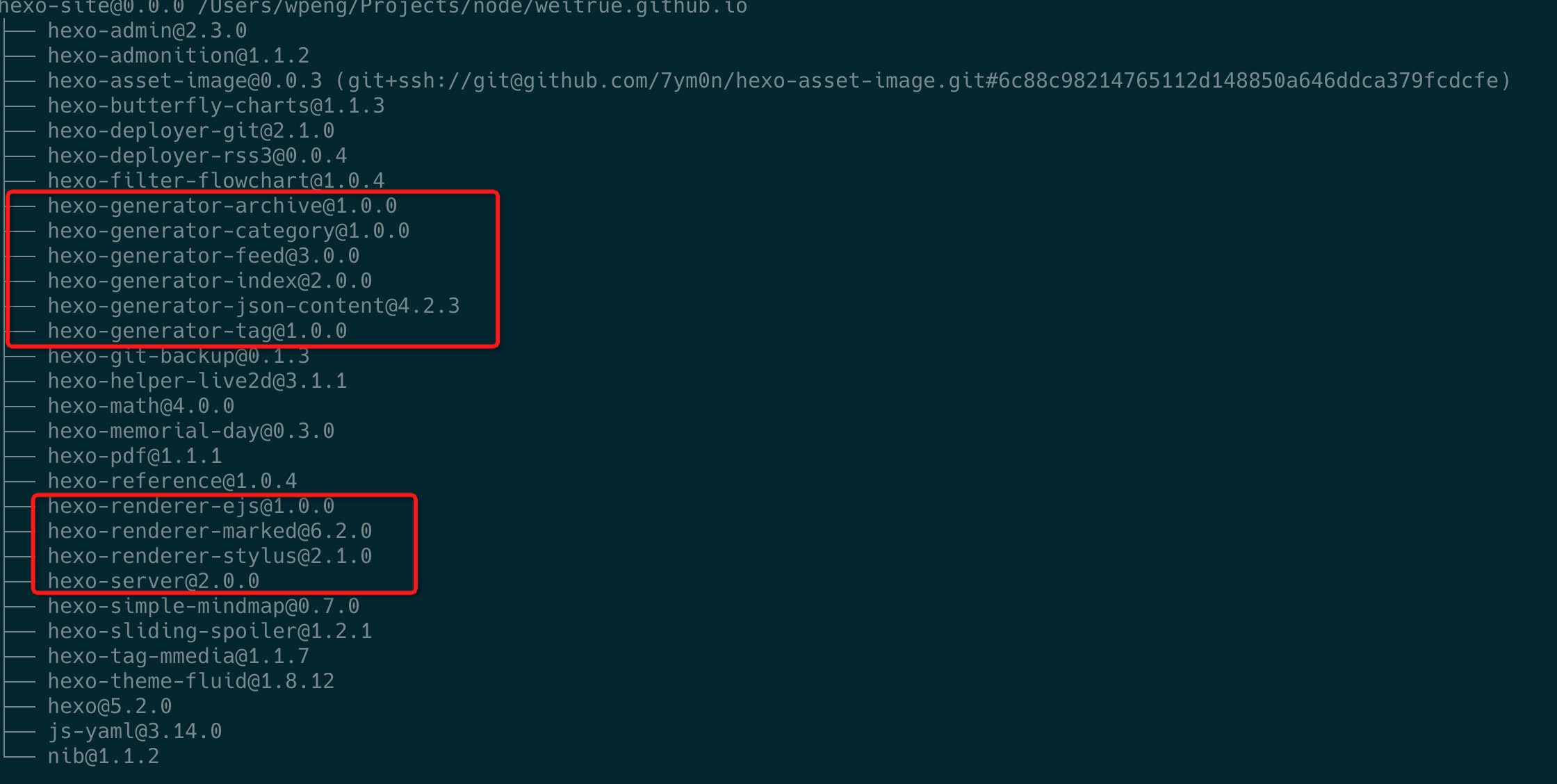
后来发现具体原因是由于 stylus 导致的,stylus 在 0.54.8 版本修复了这个问题(见 pr #2538 ),所以重新装一下 hexo-renderer-stylus 就可以了[3].

1
npm install hexo-renderer-stylus --save
Fluid主题LaTeX 数学公式需要更换渲染器

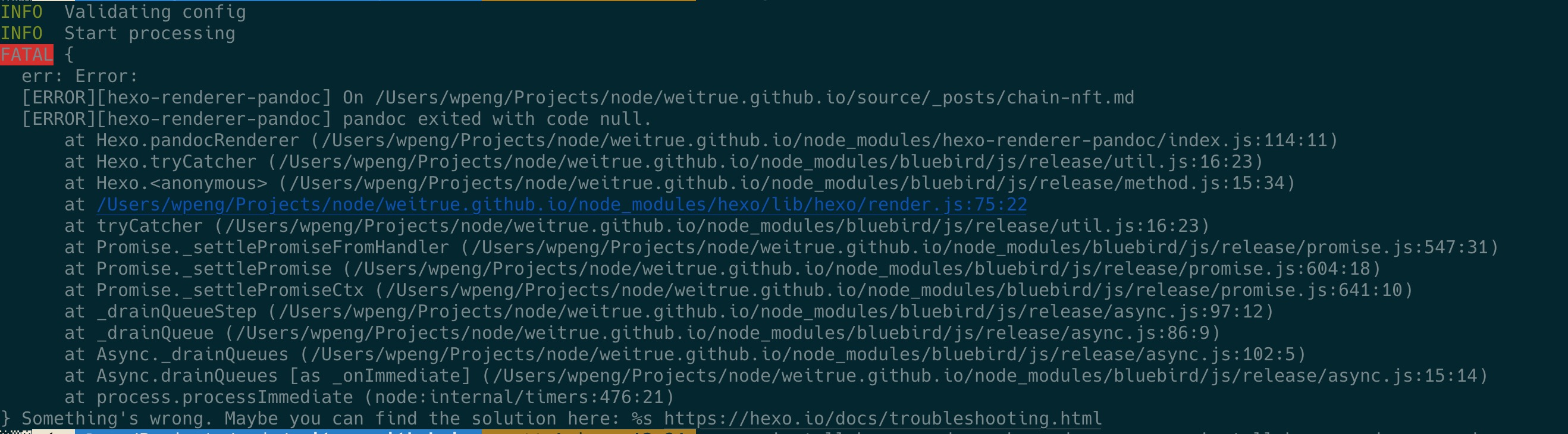
MathJax 的老用户,需要将原 kramed 渲染器更换为 pandoc ,否则hexo g会报错

安装命令

1
2
npm uninstall hexo-renderer-kramed --save 
npm install hexo-renderer-pandoc --save
Hexo生成页面缺失问题

网上有三种情况:

1.缺失相应包文件

这里备份一下所需的基本文件

2.缺失相应配置文件

3._post目录下没有.md文件

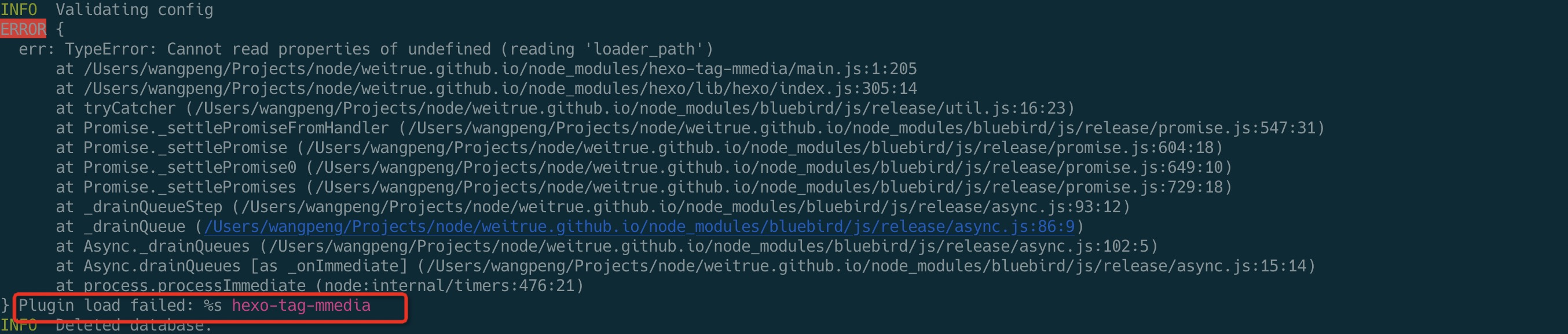
Hexo使用mmedia插件冲突

MonoLogueChi 自用的一个媒体插入插件mmedia会与hexo-tag-aplayer插件冲突,需要卸载

1
2
npm uninstall hexo-tag-aplayer --save 
npm install hexo-tag-mmedia --save

【备忘录】工作与学习
https://weitrue.github.io/2024/06/06/memo/
作者
Pony W
发布于
2024年6月6日
许可协议